If you need to access assets across VPCs, IDCs, or other non-Tencent Cloud assets, ensure that the BH is network-accessible to your assets. This can be achieved through methods such as Network Domain, DC, CCN, or Peering Connection. These methods may incur additional fees. For Network Domain pricing, see Billing Overview, and for other methods, see the respective product billing documentation.
2. In the left sidebar, choose Asset Mgmt > Database.
3. On the Database page, click Add database.
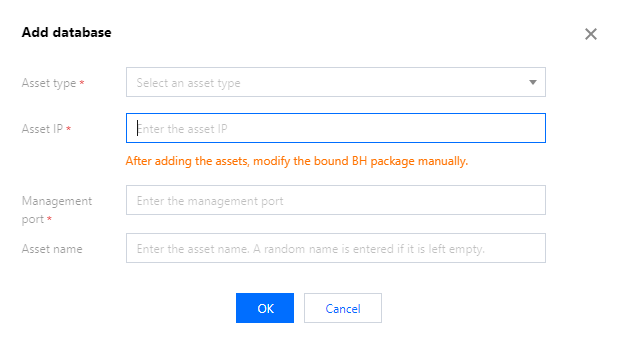
4. In the Add Database popup, configure the following host information:
Parameter Name
Description
Asset type
Select the protocol type of the database. Currently, only MySQL, SQL Server, MariaDB, PostgreSQL, MongoDBReplicaSet, MongoDBSharded, and Redis are supported.
Asset IP
Enter the IP address of the database asset.
Management port
Enter the management port of the database.
Asset name
Enter a custom asset name. If left blank, the asset name will be generated automatically.
5. After configuring the asset information, click OK to create the database.
6. After the database is created, on the Database page, select the corresponding database and click Host Assets.
7. In the Managed Assets window, select the BH service to bind, then click OK to complete the modification.