tencent cloud
Promotions
Products
Solutions
Pricing
Partner Network
CloudApp
Explore
Prev
Next
Help us improve! Rate your documentation experience in 5 mins. |Start Now
Creating an Asset Group
Download PDF
Last updated: 2025-04-18 10:43:32
Creating an Asset Group
Last updated: 2025-04-18 10:43:32
Download PDF
Overview
The BH system allows assets with the same attributes or management requirements to be grouped for unified management and permission assignment. Below is a detailed instruction on how to create an asset group.
Directions
1.
Log in to the
BH console
.
2.
In the left sidebar, choose
Asset Mgmt
>
Database
.
3.
On the Asset group page, click
Create asset group
.
4.
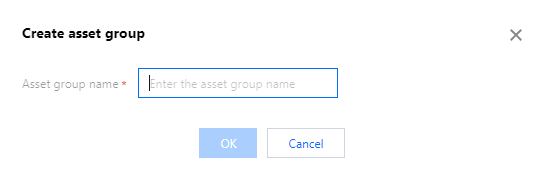
In the Create asset group popup, you need to configure the following information:
5.
Once the asset group information is configured, click
OK
to create the asset group.
Was this page helpful?
You can also
Contact Sales
or
Submit a Ticket
for help.
Yes
No
Feedback