
Importing and Exporting Users

Last updated: 2025-04-18 10:43:35
Overview
You can use the user import feature to add users in batches or use the export feature to export users in batches.
Importing Users
1. Log in to the BH console.
2. In the left sidebar, choose User Mgmt > User.
3. On the User page, click Import users >Download template. After downloading successfully, complete the relevant user information locally.
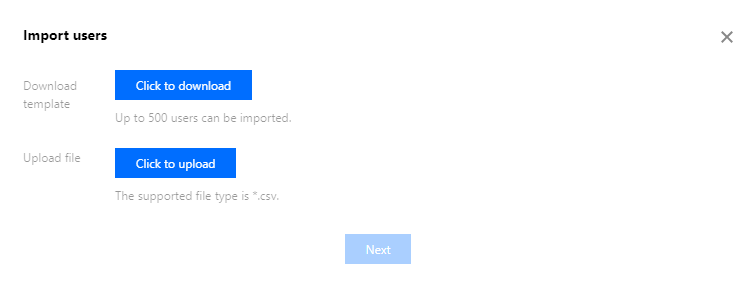
4. Once the template is filled out, click Click to upload to upload the completed template file.
5. After uploading, click Next to proceed to the Information Confirmation page.
6. On the Import Information Confirmation page, you can modify any information that does not meet the requirements.
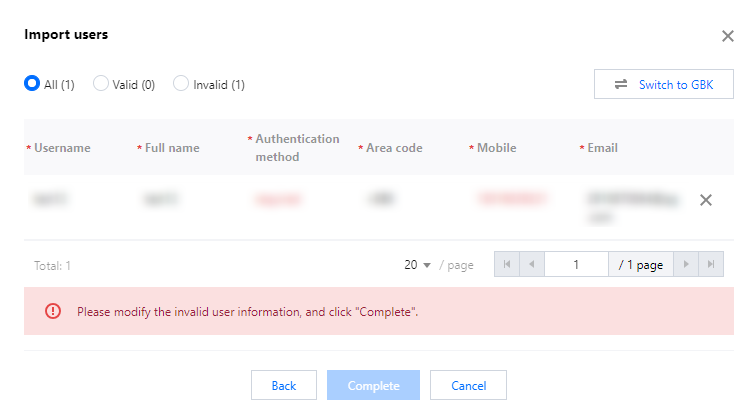
7. Once the user information is confirmed to be correct, click Complete to complete the user import.
Exporting Users
On the User Page, select the users you want to export and click Export users to download the exported user information via your browser.

Was this page helpful?
You can also Contact Sales or Submit a Ticket for help.
Yes
No
Feedback