
Python

Last updated: 2025-04-23 20:43:11
Feature Description
Edit Python code on node, and support submitting commands to WeData's Workflow Scheduling System for scheduling execution.

Parameter Description
Parameter | Description |
Python version | Support Python 2 and Python 3. |
Retrieve SSM Credential Content Without Using Secret Id & Secret Key
Use Cases
Hope to hide secret_id and secret_key and still obtain the credential value stored in ssm.
Usage
Step 1: Install the Required Python Package on the Resource Group
1. Enter Project Management > Project Execution Resource Group > Scheduling Resource Group, select a scheduling resource group and click the name to enter the details page.
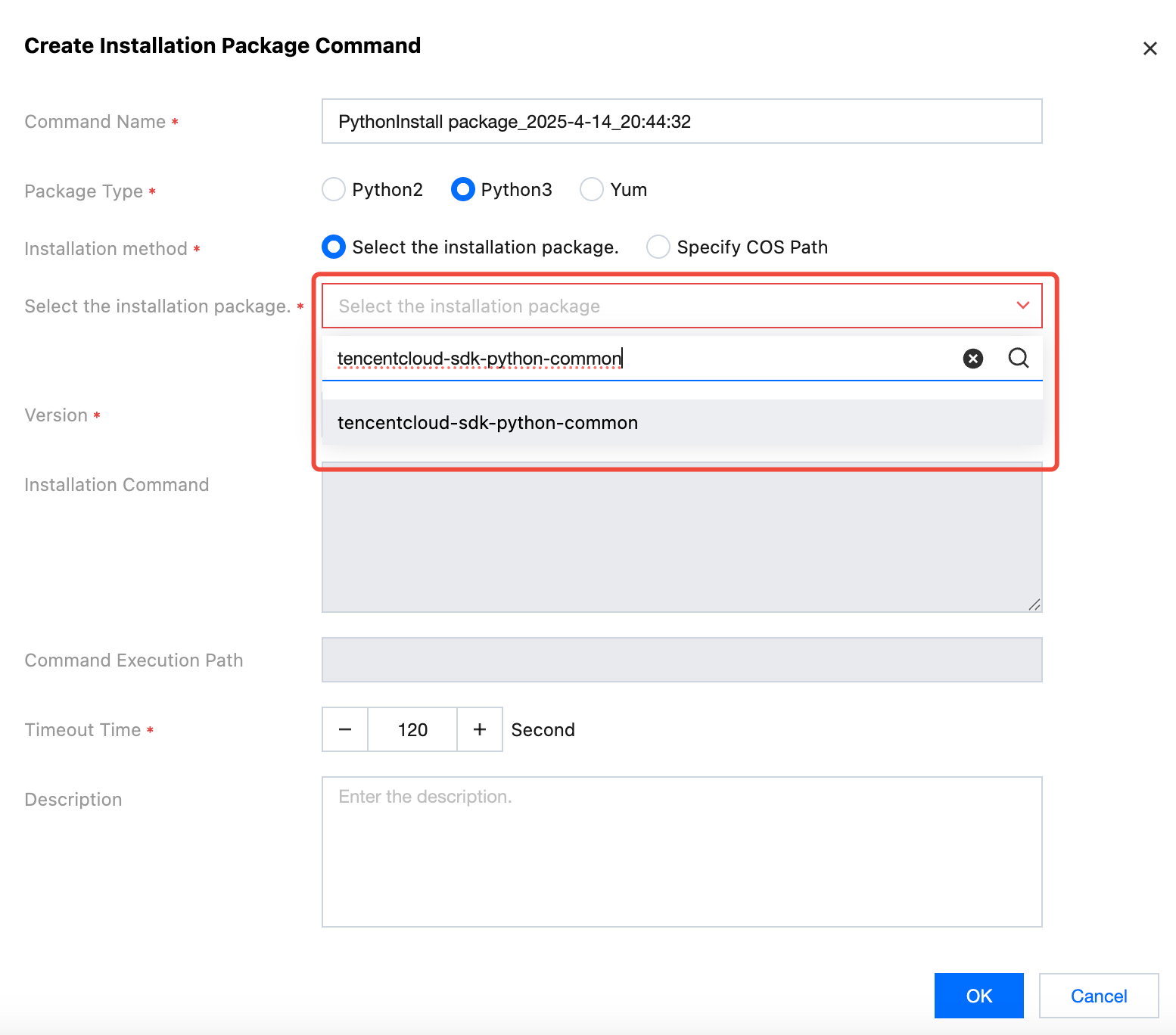
2. On the resource group operation and maintenance interface, create an installation package command, select the following two installation packages that need to be installed, and click OK.
3. In the list operation column of the installation command, click Run, refresh to check the status. If the status is running successfully, it indicates successful installation.
tencentcloud-sdk-python-common
tencentcloud-sdk-python-ssm
Step 2: Configure the Resource File
1. Enter Offline Development > Resource Management. After completing the creation of a new resource and uploading the resource file, click Confirm.
2. Create a resource using a local .py file. For example, the resource name is test_ssm, and the resource content is as follows.
import osfrom tencentcloud.common import credentialfrom tencentcloud.common.exception.tencent_cloud_sdk_exception import TencentCloudSDKExceptionfrom tencentcloud.ssm.v20190923 import ssm_client, modelsdef get_secret_value(secret_name, version_id, region):try:secret_id = os.environ.get('dynamic_secret_id', '')secret_key = os.environ.get('dynamic_secret_key', '')dynamic_token = os.environ.get('dynamic_token', '')# Initialize a credential objectcred = credential.Credential(secret_id, secret_key,dynamic_token)# Initialize the client object for the product (ssm)client = ssm_client.SsmClient(cred, region)# Initialize a request objectreq = models.GetSecretValueRequest()# Set the credential namereq.SecretName = secret_namereq.VersionId = version_id# Send requestresp = client.GetSecretValue(req)# Output JSON format response#print(resp.to_json_string())# Return the credential valuereturn resp.SecretStringexcept TencentCloudSDKException as err:print(f"Error occurred: {err}")return None
Step 3: Obtain SSM Credential Content in Python Task
Turn on the switch in the Python task and refer to the resource.
Enable: Get dynamic key
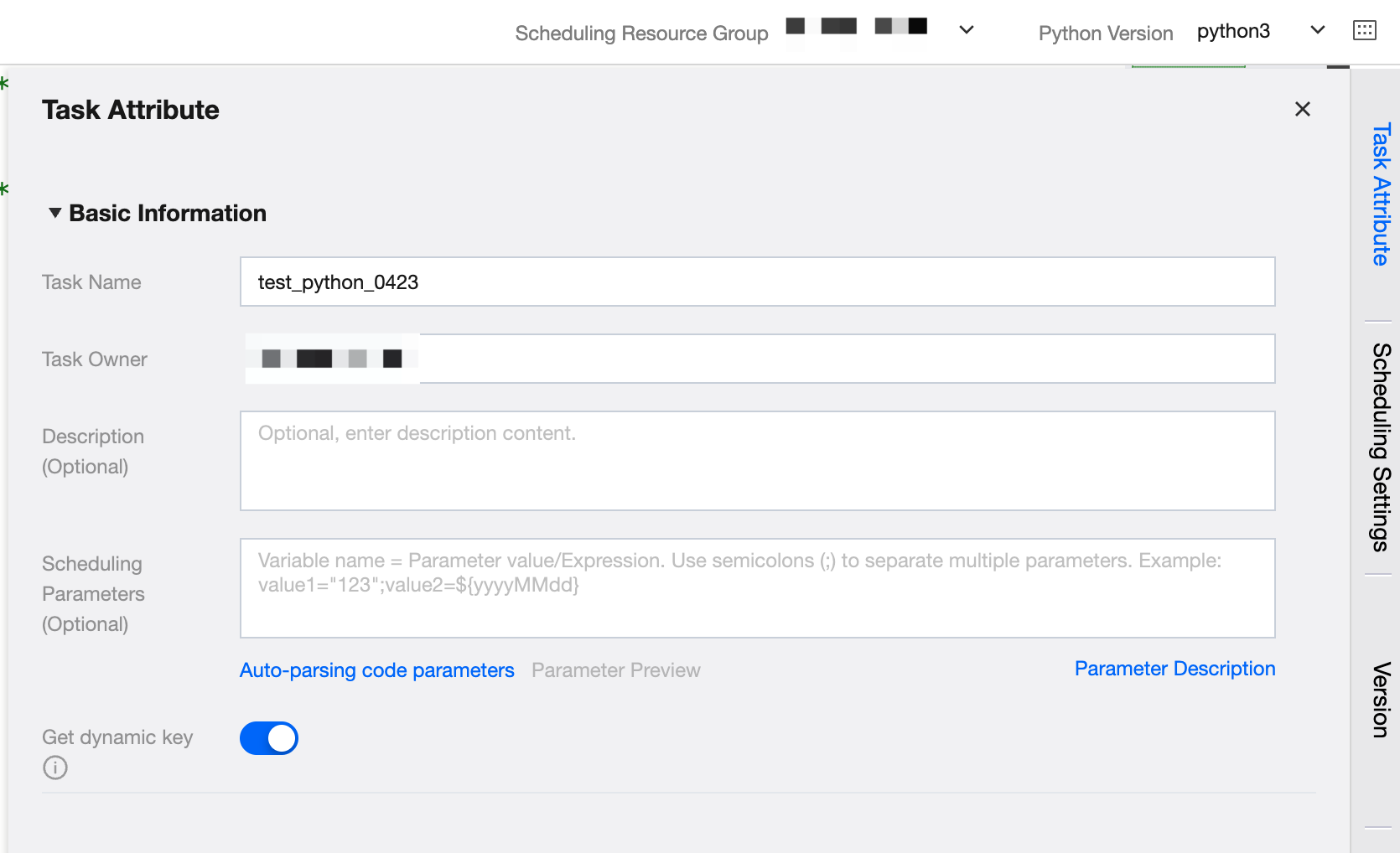
The way to obtain credential content in Python task code, with sample code as follows:
import osfrom test_ssm import get_secret_value #test_ssm is the resource namesecret_name = "test_lola" #Credential Nameversion_id = "1.0" #Credential Versionregion="ap-singapore" #the region of Credentialsecret_value = get_secret_value(secret_name,version_id,region) #Get the credential contentprint(secret_value)
Was this page helpful?
You can also Contact Sales or Submit a Ticket for help.
Yes
No
Feedback