
Migrating Across AZs

Last updated: 2025-10-11 10:32:47
Scenario
You can migrate an instance to another AZ within the same region. All attributes and configurations (including the private network address and the subnet) of the instance remain unchanged after migration. The amount of time required is proportional to the volume of data in the instance. The more data there is, the longer the data migration takes. In addition, the instance access is not affected during migration.
Supported Instance Types
Instances of the single-node (formerly Basic Edition), two-node (formerly HA/Cluster Edition), and multi-node editions are supported.
Note:
If a two-node (formerly High Availability/Cluster Edition) primary instance has read-only replicas or implements the pub/sub messaging paradigm, you need to submit a ticket to migrate it across AZs.
Read-only instances are not supported.
Prerequisites
The region where the instance resides must have multiple AZs.
Impact
An ongoing migration cannot be canceled.
The name, access IP, and access port of the instance remain unchanged after migration.
Data migration will occur during the instance's migration to another AZ. During the data migration, the instance can be accessed normally and your business will not be affected.
The amount of time required is proportional to the volume of data in the instance. The more data there is, the longer the data migration takes.
An instance switch will be performed at the specified time after migration is completed, which will cause a second-level momentary database disconnection. Make sure that the reconnection mechanism is configured for the business.
Directions
Migrating across AZs
1. Log in to the TencentDB for SQL Server console. In the instance list, click an Instance ID or Manage in the Operation column to access the instance details page.
2. On the Instance Details page, click Migrate across AZs next to the Region/AZ to enter the cross-AZ migration page.

3. On the cross-AZ migration page, complete the following configurations, review and select the cross-AZ migration considerations, then click Submit.
Note:
Due to business security and risk control requirements, the system may prompt you to restart the instance in rare cases to lift the feature limitations when you perform the cross-AZ migration operation on instances. At this point, follow the prompt in the console to complete the instance restart before you perform the cross-AZ migration operation.
After you click Submit, instance data will be migrated to the target AZ at the underlying layer without affecting instance running and access.
After instance data is migrated, an instance switch will occur (Upon migration completion or During maintenance time), causing a flash disconnection. After the switch is done, the whole process of cross-AZ migration is completed.
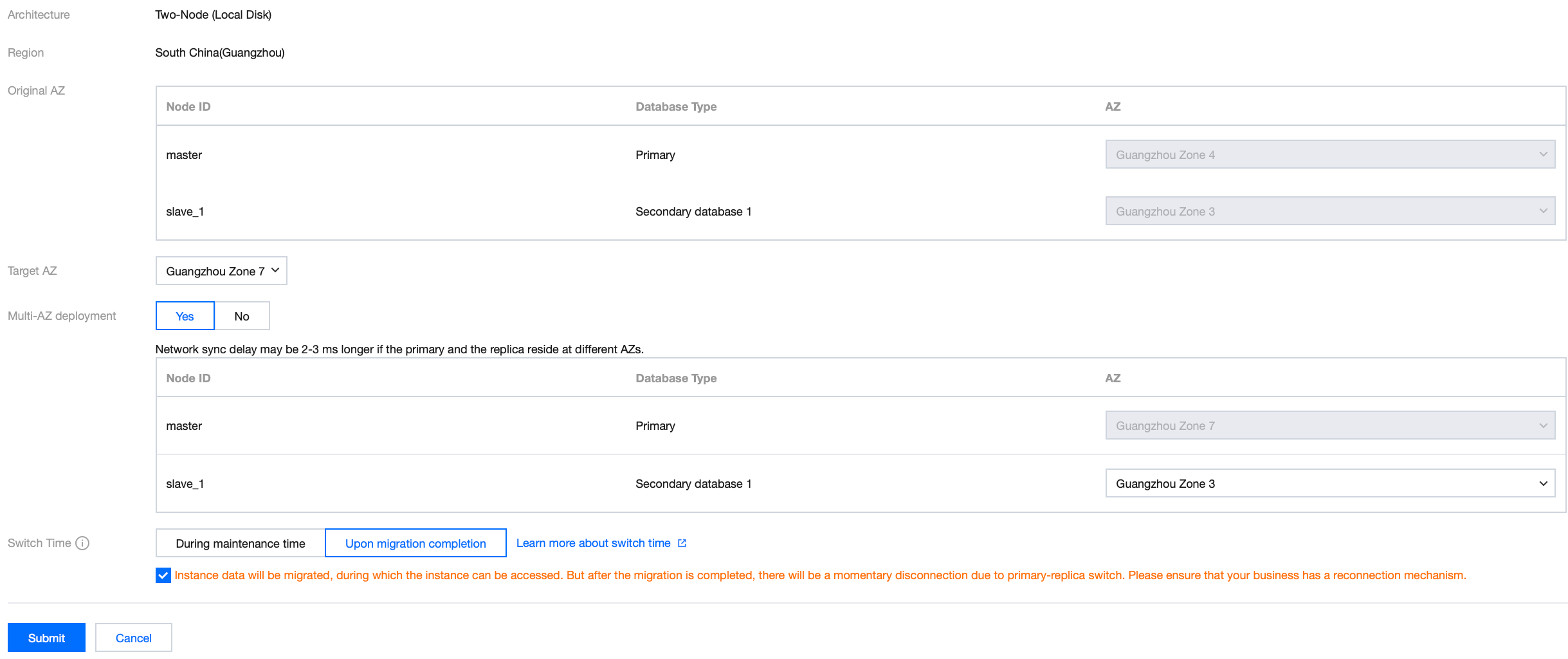
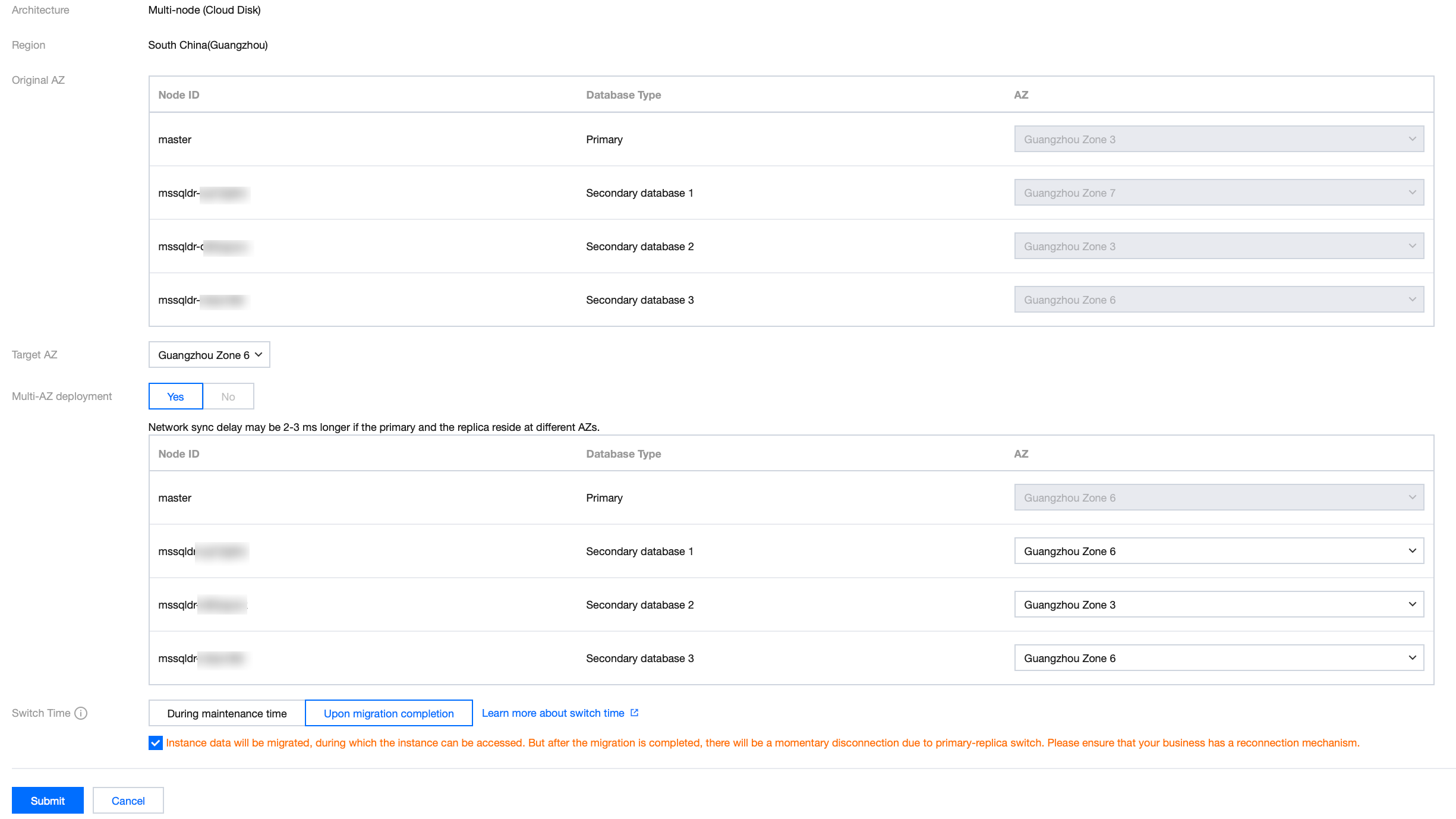
Parameter | Description |
Original AZ | You can query the AZ deployment status of the primary and replica databases of the instance in the current AZ. You can also find the nodes that need to be migrated across AZs by the Node ID field. |
Target AZ | It is the current AZ of the primary database by default. If you want to change AZ of the primary database, specify the AZ here |
Multi-AZ deployment | You can enable or disable multi-AZ deployment for two-node instances here. Multi-node instances do not support disabling multi-AZ deployment. When this feature is enabled, you can set the AZ of the replica database. Selecting Yes means that the primary and replica databases are in different AZs. As a result, the synchronization latency may increase by 2–3 ms. If you select Yes, you can replace the AZ of the replica database. The specific available AZs that can be selected are subject to actual resources. You can view available AZs in the console. If you select No, the primary and replica databases are in the same AZ, but no AZ-level disaster recovery capability is available. It is recommended that you select Yes to enable multi-AZ deployment. |
Time switch | Select the switch time for the cross-AZ migration operation. Within maintenance window: A switch will be performed within the maintenance window you have set after migration is completed. Upon migration completion: A switch will be performed immediately upon the completion of migration. |
Viewing migration tasks
You can view cross-AZ migration tasks in the Running Tasks box in the upper-right corner of the Database Management tab.
Performing immediate switch
If the instance is scheduled to be switched during the maintenance time according to the configurations of its cross-AZ migration task, but you need to switch it urgently under special circumstances, you can click Switch Now in the Operation column in the instance list in the TencentDB for SQL Server console.
Was this page helpful?
You can also Contact Sales or Submit a Ticket for help.
Yes
No
Feedback