If you don't want to manually renew a domain, Tencent Cloud provides the auto renewal feature. After it is enabled, the system will automatically renew a domain before it expires. You need to make sure that your account balance is sufficient; otherwise, renewal will fail.
Note:
Starting from April 2020, domains with auto renewal enabled will be renewed 14 days before expiration.
If renewal fails due to insufficient account balance, the system will retry renewing until the renewal succeeds or the renewal grace period ends.
A domain that fails to be renewed will enter the redemption period and may be released and deleted eventually. Keep your account balance sufficient to prevent automatic renewal failures.
Once expired, a domain cannot be transferred out. You need to renew it before transferring it out. For more applicable rules, see Domain Transfer Out Rules.
Within 30 days after a domain expires, its status will change from renewable to redeemable. We recommend you renew it within 29 days after it expires.
Directions
1. Log in to the Domains console and enter the My Domains page.
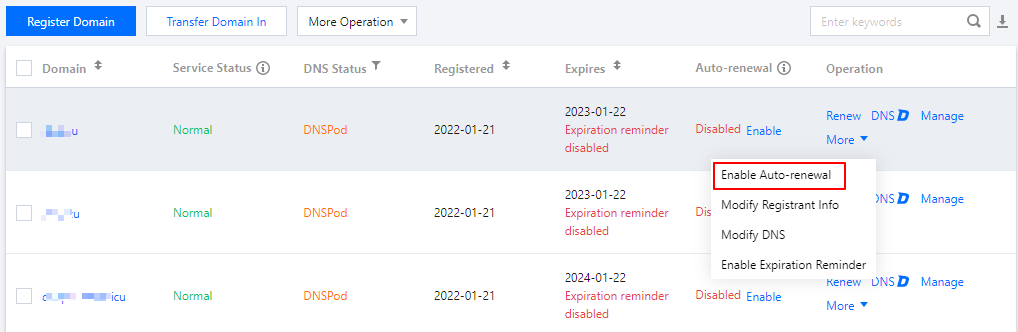
2. In the row of the domain for which you want to set auto renewal, click Enable or More and select Enable Auto-Renewal as shown below:
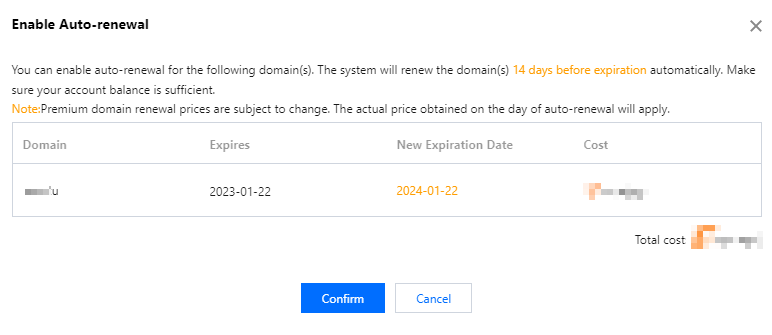
3. Check your domain renewal information and fees and click Confirm. Then, the auto renewal feature will be enabled as shown below: