
iOS

最后更新时间:2024-04-17 11:49:35
简介
应用场景
高级画中画优势:
加密视频画中画:现有播放器的加密播放紧密结合,能够顺畅实现基于加密模板的视频画中画播放,全程无需更换播放器类型。
离线播放画中画:支持本地视频画中画播放,包含普通视频、加密视频等。
“秒切”效果:无需点击切换画中画按钮,退后台即可立马启动画中画,实现真正意义的“秒切”。
环境要求
系统版本:iOS ≥ 14.0、iPad ≥ 9.0。
硬件设备:iPhone 8及以上的设备。
SDK 版本:11.4版本及以上。
集成步骤
升级版本及配置资源
1. 升级 SDK 版本
高级画中画需要 SDK 配合使用,在使用高级画中画版本功能前需要将 SDK 的版本升级到11.3及以上的高级版本 或 11.4及以上的基础版本,否则无法使用。同时,基础画中画 版本和高级画中画版本两者可以兼容性的存在,不会存在功能性冲突。若想升级 SDK 版本,请参见 SDK 集成指引。
2. 引入 bundle 资源
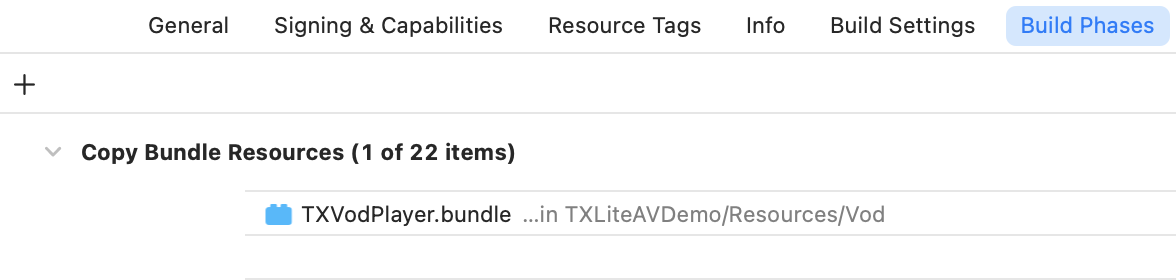
因为 SDK 内需要使用 TXVodPlayer.bundle 里的资源,需在编译之前将 bundle 文件 下载 引入到项目中,切勿更改 bundle 及其内部使用的资源名称,否则会导致无缝切换画中画失败。
3. 开通播放器高级版 Licence
高级画中画版本需要使用移动端播放器高级版 License,您可参见 移动端播放器 License 指引获取。若您已获取对应 License,可前往 腾讯云视立方控制台 > License 管理 > 移动端 License 获取对应 LicenseURL 和 LicenseKey。如果没有申请 Player 高级套餐 License,进入画中画将无效。
获取到 License 信息后,在调用 SDK 的相关接口前,通过下面的接口初始化 License,建议在
- [AppDelegate application:didFinishLaunchingWithOptions:] 中进行如下设置:- (BOOL)application:(UIApplication *)application didFinishLaunchingWithOptions:(NSDictionary *)launchOptions {NSString * const licenceURL = @"<获取到的 licenseUrl>";NSString * const licenceKey = @"<获取到的 key>";//TXLiveBase 位于 "TXLiveBase.h" 头文件中[TXLiveBase setLicenceURL:licenceURL key:licenceKey];NSLog(@"SDK Version = %@", [TXLiveBase getSDKVersionStr]);}
画中画功能快速接入
1. 权限开通
画中画(PictureInPicture)在 iOS 9 就已经推出了,不过之前都只能在 iPad 上使用,iPhone 要使用画中画需更新到 iOS 14 才能使用。 目前腾讯云播放器可以支持应用内和应用外画中画能力,极大的满足用户的诉求。使用前需要开通后台模式,步骤为:XCode 选择对应的 Target > Signing & Capabilities > Background Modes,勾选 “Audio, AirPlay, and Picture in Picture”。

2. 设置配置选项
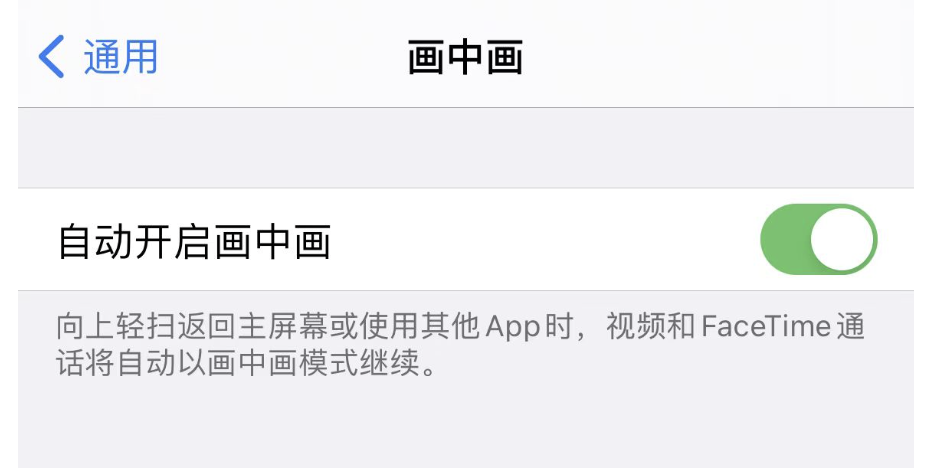
为了使用自动画中画功能,需要在设置中打开自动开启画中画按钮。具体路径为 iPhone 或 iPad上选择:设置 > 通用 > 画中画 > 自动开启画中画,选择打开即可。
3. 设置代理
为了便于监听画中画的状态,需要设置 vodDelegate,实现 TXVodPlayListener 中的画中画相关回调。可以根据回调里的各种状态和错误信息,进行相关的业务操作,例如:继续播放、暂停或退出画中画等。
/*** 画中画状态回调** 画中画状态回调*/- (void)onPlayer:(TXVodPlayer *)player pictureInPictureStateDidChange:(TX_VOD_PLAYER_PIP_STATE)pipState withParam:(NSDictionary *)param;/*** 画中画错误信息回调** 画中画错误信息回调*/- (void)onPlayer:(TXVodPlayer *)player pictureInPictureErrorDidOccur:(TX_VOD_PLAYER_PIP_ERROR_TYPE)errorType withParam:(NSDictionary *)param;
4. 使用画中画能力代码示例
注意:
使用自动画中画功能一定要确保播放器处于播放状态,若播放器是暂停或停止状态时,无法使用自动画中画功能。
isSupportSeamlessPictureInPicture 这个接口,需要在应用程序加载高级版 License 以后才能使用。同时,此接口只能判断设备本身是否支持自动切换画中画,因系统限制,无法判断用户对于自动画中画的设置权限,需自行引导。
播放之前先设置是否允许“自动切换画中画功能”
// 1.播放之前先设置“自动切换 Picture-In-Picture功能”是否允许// YES 表示允许 NO 表示不允许,默认为NO[TXVodPlayer setPictureInPictureSeamlessEnabled:YES];// 2、进入画中画if (![TXVodPlayer isSupportPictureInPicture]) {// 设备不支持画中画直接退出return;}// 手动调用进入画中画[_vodPlayer enterPictureInPicture];// 3、退后台操作 如果设备支持无缝切换画中画,退后台不暂停播放。// 注意:isSupportSeamlessPictureInPicture这个接口,需要在应用程序加载高级版License以后才能使用。同时,此接口只能判断设备本身// 是否支持自动切换画中画,因系统限制,无法判断用户对于自动画中画的设置权限,需自行引导。if ([self.vodplayer isSupportSeamlessPictureInPicture]) {// 不做处理} else {// 暂停播放[self.vodplayer pause];}// 4.退出画中画[_vodPlayer exitPictureInPicture];
文档反馈